

Diverging Picklists, Deliveries and Invoices
Most orders will follow a simple flow of Order > Picklist > Delivery > Invoice.
In some cases, this is not always possible, so the system allows you to diverge into multiple picklists, deliveries and invoices.
See the following 4 scenarios:
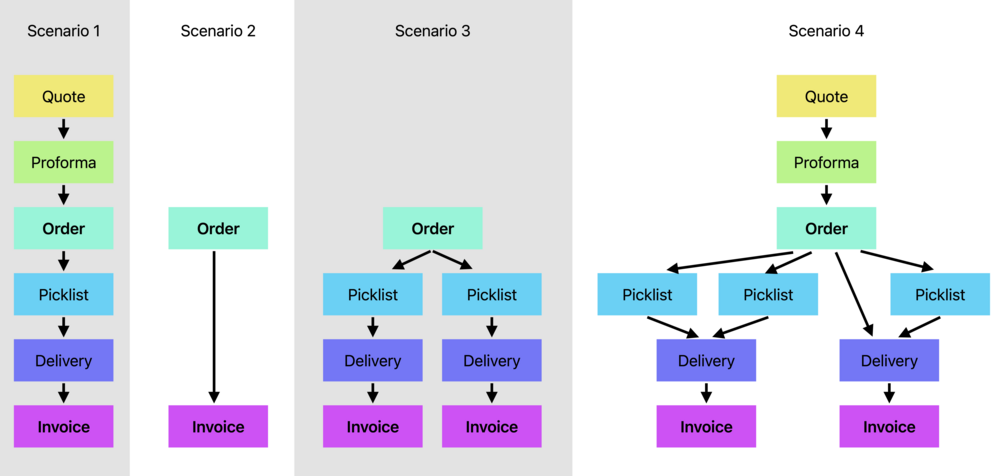
Scenario 1:
The simple flow, we follow every step, from quote to invoice.
Scenario 2:
A customer walks in to store, picks an item from a shelf and brings it to the counter.
There is no need for a quote or proforma, as the customer has seen the pricing at the shelf, and has committed to purchase.
We directly Raise Order.
Similarly, there is no need for a picklist or delivery, as the customer already has the item at the counter, and will take it away with them.
We directly Raise Invoice, we can print or email the PDF to the customer.
Scenario 3:
We receive an order for multiple items from a customer, but our stock is stored in different warehouses.
We raise separate picklist for each warehouse and are dispatched from both locations.
We can raise a separate invoice for each warehouse.
Scenario 4:
The customer places an order for multiple items, some are on backorder, one of the items is a bespoke item.
The customer wants us to ship the in-stock items as soon as possible.
We Allocate the items we have in stock, and click Raise Picklist for these items.
A warehouse operative begins the picklist and marks some items as picked.
Meanwhile, the customer calls and asks to add an item to their order, we have the stock available.
The stock is allocated and we again click Raise Picklist.
The system will not append an in-progress picklist as this can cause confusion for the operator.
Instead, a second picklist is raised for the new item.
Once both picklists are competed, we choose to Raise Delivery.
The system determines that all allocated items on this order are picked and adds them to a single delivery.
The items are collected by the haulier and the delivery is marked as shipped.
We click Raise Invoice for the shipped order and send it to the customer.
Later, we receive all of our out-of-stock items, and our bespoke item has arrived.
We click Raise Delivery for the bespoke item. This is our second shipment on this order.
We allocate stock for the remaining items and then Raise Picklist.
The picklist is picked, we Raise Delivery.
As the second delivery has not yet been shipped, the remaining items are added to it.
The items are shipped, we click Raise Invoice, the order is now complete.